Lemonlight's Hero Turns a Client Brief Into a Script and Storyboard in One Synced AI Production Hub
VP Land
Nov 21, 2026 · 3 min read
Lemonlight is positioning Hero, which No Film School covers as a new AI production operating system, as a single synced hub that takes a project from a client brief to a treatment, script and storyboard. In Lemonlight's example workflow, rewriting a scene updates the shot list and schedule with it, which matters if your boards, scripts and schedules usually live in separate apps.
References hold across shots. Lemonlight says reference photos carry through every frame, so an actor in shot one has the same face in shot 20 and logos never drift.
The agent edits the work directly. Lemonlight says the Hero production agent can revise content itself, whether the project is shot traditionally or generated with AI.
Your own AI assistant can work inside it. Hero runs as an MCP server, so an assistant such as Claude can edit text, make images and call sheets, and reply to comments in your projects.
Built by a production company. Hero comes from Lemonlight, a video production company behind more than 50,000 brand videos.
One project holds the treatment, script, storyboard, schedule and call sheets
Hero's own site describes it with the line "See the video before you make it," and says the platform turns an idea into a script, storyboards, a shooting schedule and call sheets in one place.
Projects can start with the built-in Hero Agent. You describe the idea, attach files and pick a Project Type, and Hero creates the project, saves the files to Assets and opens a chat; a Start from blank option opens an empty document with the chat beside it instead.
The agent asks before it generates. Its first reply sums up your brief, saves the hard facts it found as Project Rules, and asks about audience, tone and story approach; for non-scripted work such as interviews, it asks about shoot dates, locations, who is filmed, crew and deliverables.
Storyboard changes work at the element level. Tell the agent a character now wears a red coat and it updates every frame using that character in one request, and it can also switch a board to 9:16, turn frames into sketches, or set a frame's shoot date and status.
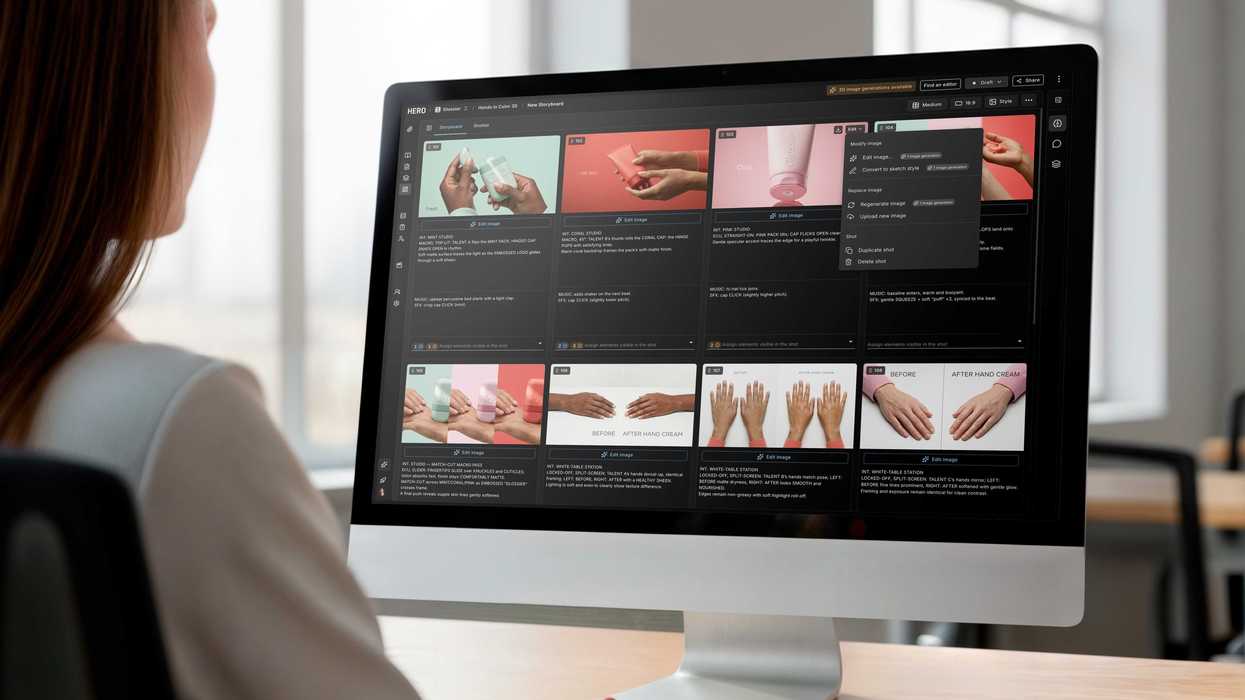
Hero's storyboard grid for a skincare product spot, with scene notes and an image edit menu. Image: No Film School
Hero's MCP server lets Claude and other assistants work inside projects
Connecting Claude, as laid out on Hero's updates page, runs through Claude's Connectors settings and needs a free Hero account. The assistant then works in your projects with your own Hero permissions.
The in-app agent also handles project housekeeping:
Files and versions. Create and move folders, duplicate documents, and restore an earlier version after you confirm.
Comments. Reply to and resolve threads; comments on deliverables come with their video timecode.
People and sharing. Invite collaborators, add crew who don't have a Hero account, and create or revoke share links.
Guardrails. Anything that removes or overwrites work asks for confirmation first, and requests that break a Project Rule get flagged with Continue and Cancel options.
Hero's tools are strongest before the camera rolls
Hope Horner, founder and CEO of video production company Lemonlight, frames Hero as an answer to tool sprawl. "After producing thousands of videos for clients, we realized that, rather than creating another AI tool, the real opportunity was building a single operating system for video production," she said.
In another company example reported by Broadcast Now, a marketer might limit Hero to a rough storyboard for an internal pitch, while a director on the same project could use it to choose the lens and lighting for each shot.
The feature set backs up the pitch most clearly in pre-production, and Hero's site calls it an AI video pre-production platform. As of the August agent launch, the Hero Agent launch notes listed watching or transcribing a video, or describing what a deliverable shows, as not yet supported, though the agent could report a deliverable's processing status.
Those notes also warn that regenerating a script or storyboard overwrites it, so asking for a specific change is the safer move. For small crews and agencies juggling briefs, boards and call sheets across separate apps, the synced project and the MCP connection are the parts worth testing.
Kling 4.0 has added native 4K video output and 10-bit HDR, which works at both 4K and 1080p, according to Kling AI's post on X. AI shots can now come out of the model at delivery resolution with more color depth for t…
NVIDIA released MotionBricks, the real-time motion generation model from its SIGGRAPH paper, in its own official GitHub repository with a new pretrained model for SOMA human characters, after a first release that cove…
Runway Labs introduced Diffusion-UI, a research application in which a real-time model generates every pixel of an interactive interface, and shared an early look at generated interfaces that can use structured data,…