About Adobe Media Encoder
Adobe Media Encoder is a professional transcoding and rendering application that sits at the heart of Adobe’s video pipeline. It is designed to take sequences, comps, and media from tools like Adobe Premiere Pro, After Effects, Audition, and Character Animator and encode them into optimized deliverables for web, broadcast, social platforms, and a wide range of playback devices. Instead of exporting directly from each creative app, editors and motion designers can offload encoding to Media Encoder and keep working while renders run in the background.
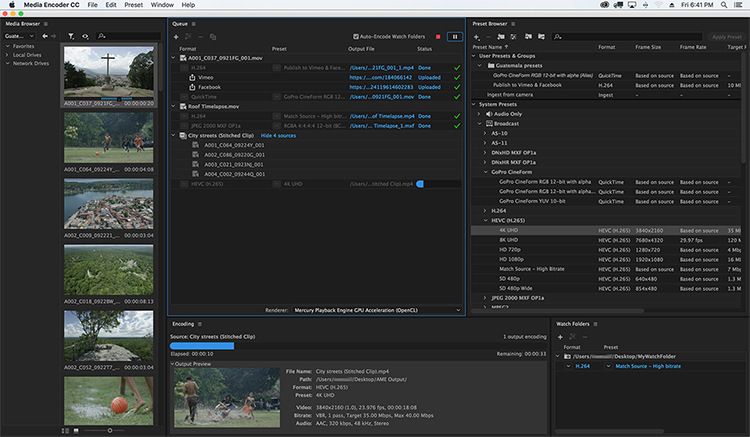
The application operates on a queue-based workflow: you send a sequence, composition, or source clip to the queue, choose from a library of presets (such as YouTube, Vimeo, H.264, HEVC, DNxHD/HR, ProRes on supported systems, image sequences, and more) or dial in fully custom settings, then let Media Encoder handle the processing. It supports ingest workflows with transcode on import, proxy creation, and watch folders, so facilities can automatically convert camera originals into house formats or lightweight editorial proxies. Recent versions add support for Content Credentials, letting you embed creator identity, usage, and generative-AI training preferences directly into exported files.
Adobe Media Encoder is aimed at video editors, motion graphics artists, online finishers, and post facilities that need reliable, repeatable output. It shines in multi-deliverable environments where the same master needs to be turned into multiple aspect ratios, codecs, and bitrates—such as OTT, broadcast, social, and client review versions—without tying up the main editing system. Tight integration with Adobe apps, preset management, and automation features make it especially strong in Creative Cloud-centric pipelines.
However, Media Encoder is not a creative editing or effects tool; it doesn’t replace NLEs or compositors and offers only limited manipulation beyond basic scaling, cropping, LUT application, and simple overlays. It’s also desktop-only and tied to an Adobe Creative Cloud subscription, with no standalone perpetual license and no public API for headless deployment. For teams already in the Adobe ecosystem and needing robust, flexible encoding, it remains a workhorse for post-production output and media processing.