Cinema 4D and ZBrush Get Touch Support on MacBook Pro, and Cinema 4D Adds Vision Pro Spatial Previews
VP Land
Nov 10, 2026 · 4 min read
Cinema 4D and ZBrush are getting Touch support on Apple's new MacBook Pro with PROLED XDR Display, and Cinema 4D adds Open in Spatial Preview, a feature for viewing scenes on Apple Vision Pro at real-world scale, according to Maxon's announcement. Both arrive in late November, giving artists direct on-screen control of their models and giving clients and collaborators a way to step inside a 3D design before anything is built.
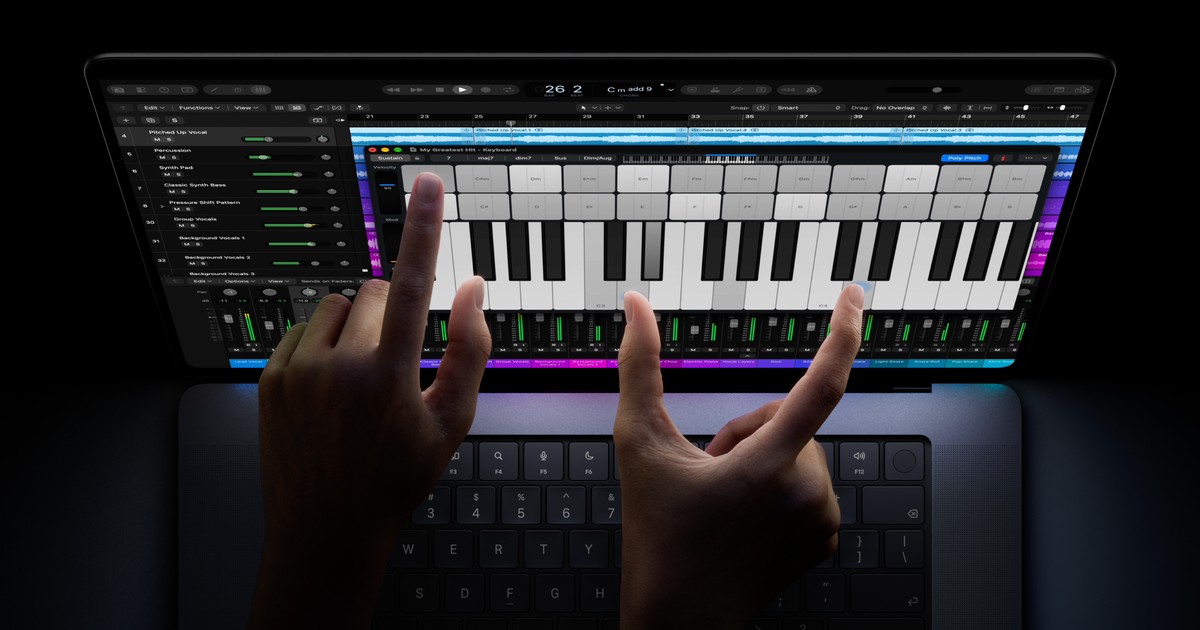
Touch sits alongside existing input. Maxon says Touch complements mouse, keyboard and trackpad workflows in both apps, and Apple says this MacBook Pro brings Touch to the Mac for the first time.
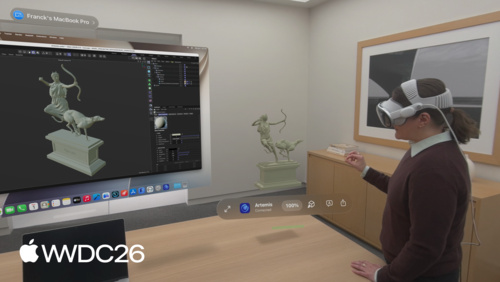
Spatial Preview runs through Mac Virtual Display. Cinema 4D will integrate Apple's new Spatial Preview API so artists will be able to explore, preview and interact with their designs life-size on Vision Pro.
Reviews can happen inside the scene. Maxon says clients and collaborators will be able to inhabit the same space at the same time, either immersed in the scene or viewing it from a bird's-eye view.
The apps run on the new laptop from day one. Cinema 4D and ZBrush are available immediately on the new MacBook Pro, with Touch and Spatial Preview following in late November.
Touch brings hands-on sculpting and animation to Maxon's desktop apps
Maxon describes Touch as a way to interact directly with work in Cinema 4D, such as building and animating complex 3D worlds.
In Maxon's ZBrush, the same input applies to developing intricate digital sculptures, bringing hands-on interaction to a professional desktop workflow.
The company's ZBrush for iPad already put professional digital sculpting on a touch-first device driven by fingers or Apple Pencil.
Touch on MacBook Pro extends that style of interaction to Maxon's established desktop applications, without replacing the mouse, keyboard and trackpad.
Touch on the new MacBook Pro with PROLED XDR Display, shown in a music app. Image: Apple Newsroom
On the hardware side, Apple's release lists M5 Pro and M5 Max chips, up to 128GB of unified memory and up to 16TB of storage in 14- and 16-inch MacBook Pro models. Apple quotes up to 2000 nits peak HDR and SDR brightness, a 10,000,000:1 contrast ratio, a 120Hz variable refresh rate and coverage of both P3 and Adobe RGB.
Maxon says the M5 Pro and M5 Max chips' graphics performance suits demanding Cinema 4D and Redshift workflows, including complex modeling, animation and rendering.
David McGavran, CEO of Maxon Computer GmbH, said, "Bringing Touch support to Cinema 4D and ZBrush on the new MacBook Pro gives artists a new way to dive even deeper into their work."
Open in Spatial Preview puts Cinema 4D scenes at real-world scale on Vision Pro
Open in Spatial Preview will let artists using Mac Virtual Display on Apple Vision Pro explore Cinema 4D scenes in an immersive environment. Instead of judging a design from a 2D image, they will be able to experience it at real-world scale and evaluate proportions and composition before production moves forward.
Maxon highlights architectural visualization, retail environments, exhibition spaces and experiential design as uses. Its examples include walking through an interior, evaluating a proposed installation and exploring the layout of a trade-show booth before anything is physically built.
The review use case is aimed at reviewers who may not be familiar with navigating professional 3D software. Maxon says experiencing a design at scale helps them understand the space, identify potential changes and give more informed feedback earlier in the process.
The feature builds on Apple's macOS Spatial Preview framework, which connects Mac apps to Quick Look on visionOS. According to Apple's visionOS 27 developer overview, the framework supports live USD editing, lighting and material overrides, annotations and collaboration through SharePlay.
In its WWDC session on Spatial Preview, Apple cited Cinema 4D and SketchUp as apps using real-time synchronization for collaborative 3D work, such as iterating on material changes live. Maxon's own announcement does not detail which of the framework's editing tools Cinema 4D exposes.
A 3D model previewed on Vision Pro beside a Mac Virtual Display, from Apple's WWDC session on the Spatial Preview framework. Image: Apple Developer
Touch and Spatial Preview arrive in late November, with Spatial Preview tied to macOS 27 and visionOS 27
Spatial Preview platforms. Maxon lists Open in Spatial Preview for Apple Vision Pro running visionOS 27 and Mac running macOS 27.
Cinema 4D only. Spatial Preview is a Cinema 4D feature; the announcement does not mention it for ZBrush.
Maxon has not shared further details on how the Touch controls map to specific tools in either application.
A free Apple Creator Studio update for existing subscribers builds MotionVFX effects, rotoscoping, tracking and color grading tools into Final Cut Pro for Mac, and adds beta AI assistants to Logic Pro, Keynote, Pages…
Chromagraph Camera, a new $12.99 iPhone app released by Chromatic Applications and built by cinematographer Steve Yedlin with director Rian Johnson, replaces the phone's default image processing with color and texture…
Blackmagic Design released DaVinci Resolve 21.1.2 with an expanded Studio scripting API that lets scripts make timeline edits such as clip trims and silence removal, according to Digital Production. For pipeline devel…